Nineteen days of ad spend with no measurement: the Google Tag Manager snippet was gone from the page, not broken in the console
A purchase conversion sat at zero for nineteen days. The container was fine - the snippet had been removed by a deploy. How to pin the hour without backend access, why you must tell Smart Bidding its data is wrong, and the fourteen-day cap that makes fast detection worth money.
The purchase conversion action on a home and living brand's main shop had recorded exactly zero events for nineteen days. Not a dip. Zero, starting on a Thursday morning and never recovering, while the campaigns kept spending through it.
Everyone's first instinct — mine included — was that something had gone wrong inside the tag manager. It hadn't. The container was intact, published, and still carrying the right conversion label. The snippet that loads it had simply vanished from the storefront. The main shop had no Google measurement, no analytics and no Meta pixel at all, and nothing anywhere had said so.
Pinning the hour without access to the backend
I don't have a login to that shop's admin, which turned out not to matter. Three independent sources agreed, and each answered a different question.
The live HTML said what was true now. I pulled the homepage and a category page and searched the full payload and every theme bundle for the tag manager host and the container ID. Zero references, and nothing in the consent-management config capable of injecting it after consent either. The consent tool still listed entries for Google conversion tracking — orphaned configuration pointing at a tag that no longer existed, which is exactly the kind of artefact that keeps a team believing the setup is fine.
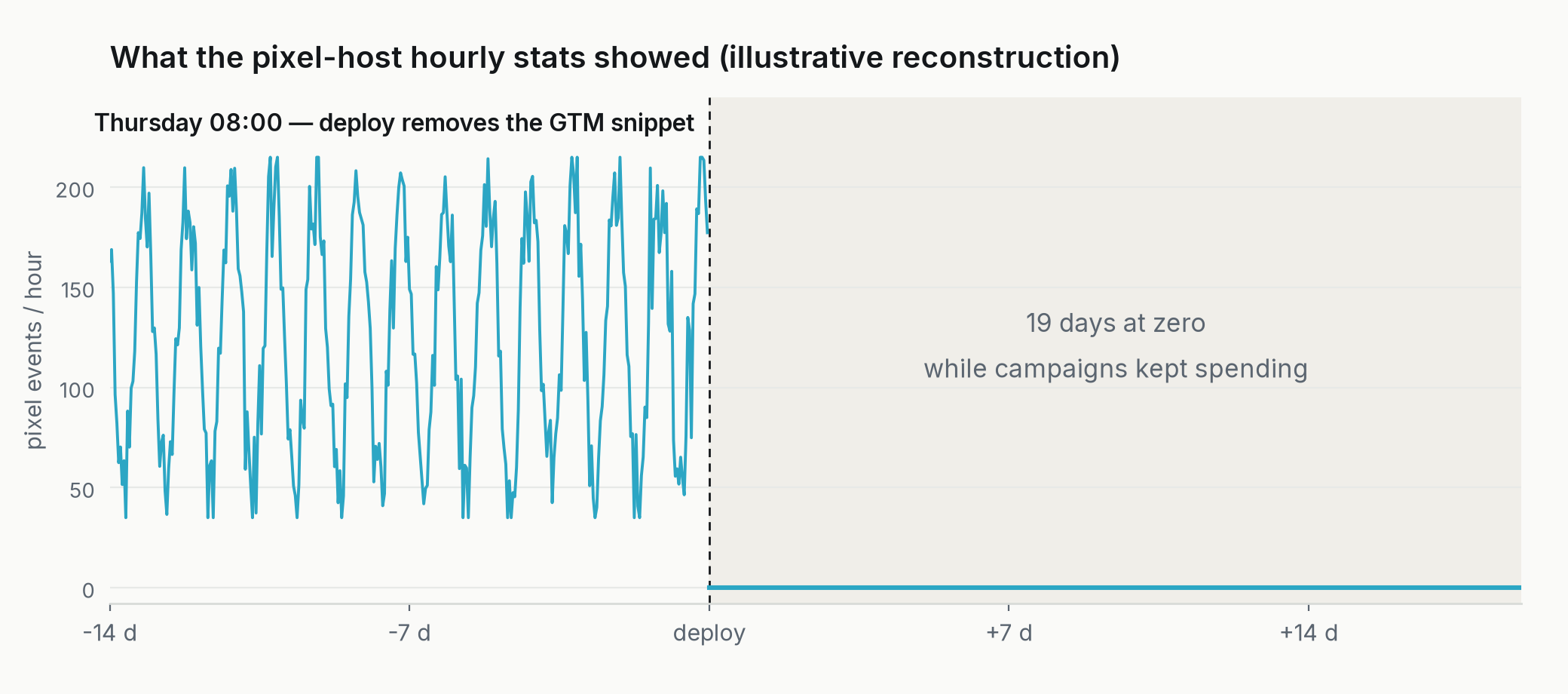
The pixel host statistics said when. The same container carried the Meta tags, and Meta reports events per hour per host. That host ran fifty to two hundred events an hour right up to and including 08:00 on the Thursday, then fell to essentially nothing and stayed there. The sister shops on other domains carried on at normal volume throughout. That narrowed the cut-off to a single hour — a morning deploy, not a gradual decay.
The conversion signature ruled out the account side. Conversions and all the micro-conversions went to hard zero on the same date, with exactly one exception: one country's brand campaign kept converting normally, because that storefront carries its tag inline rather than through the container. One surviving inline tag is a very cheap control group. It proved the ad account, the conversion action and the pipeline behind it were all healthy, and that the fault was on the page.
That is the whole method, and it generalises. When measurement disappears, ask what is different between the things that broke and the things that didn't, and find the one component they don't share.
First job after diagnosis: tell the ad platform its data is wrong
Before fixing anything on the site, there's a step most people skip, and it's the one that costs real money. The missing conversions aren't just absent from your reports. Smart Bidding was learning from them. For nineteen days the system watched clicks go out, saw nothing come back, and drew the obvious conclusion: these queries, these audiences, these products don't convert. Bid them down.
So the gap doesn't end when the tag comes back. It keeps being paid for afterwards, through a bidding model that has been taught something false about your business.
Google Ads has a purpose-built control for exactly this, and in my experience most advertisers have never opened it. Under a bid strategy's advanced controls you can create a data exclusion: you name a date range and Smart Bidding ignores that period's conversion data when it optimises. There's an API endpoint for it too, which matters if you manage several accounts.
Four things about it are worth knowing before you need them, because you will be reaching for this under time pressure.
Apply it the moment you identify the problem, not after the fix ships. The exclusion is what stops the bad lesson; repairing the tag only stops new bad data.
The dates apply to clicks, not conversions. If your typical conversion lag is a week, the clicks that would have converted during the blackout happened before it started — so the exclusion window has to reach back further than the outage itself, or you leave exactly the clicks that look worst still in the training data.
It's capped at fourteen days. That is the detail that reframes this whole post. My outage ran nineteen. The platform's own repair tool tops out shorter than the time it took me to notice, which means a meaningful slice of that damage simply cannot be excluded — it is permanently in the model's history. If you want a business case for building the monitoring in the next paragraph, it's that number: you have roughly two weeks of recoverable error, and after that the loss compounds quietly.
It is not a routine hygiene tool. Google is explicit that frequent or extended use degrades Smart Bidding performance, and recovery after a long gap can take one or two conversion cycles anyway. Excluding a genuine outage is good practice. Excluding every week you didn't like is how you end up with a bidding model trained on a fiction of your own construction.
One more thing the exclusion does not do: it doesn't fix your reporting. The numbers in the account stay wrong for those dates forever, which means any month-on-month comparison spanning the gap is comparing two different measurement regimes. So the second move is editorial, not technical — declare the gap in the reporting itself. In the client review document covering that period I named the blackout window, stated that the figures were under-recorded, and gave the clean reading window explicitly. It's the same discipline as refusing to compare two periods measured with different rulers: a number with its limitation stated is usable, and a number silently missing three weeks of conversions will be quoted back at you for a year.
Zero is not an alert
Here is the part I've changed my own practice over. Nineteen days of paid spend went out with no measurement behind it, and the system that was supposed to notice was me, manually, during a weekly review. Every tool involved was working correctly. The ad platform reported zero conversions, accurately. The tag manager reported a healthy published container, accurately. The consent tool reported its configuration, accurately. Not one of them is built to say the page stopped asking for me.
Tracking rarely breaks inside the tool you'd go and check. It disappears from the page, and the tool keeps telling you it's fine, because from where it's standing, it is.
Google's own site reliability writing has the cleanest framing for this: alert on symptoms, not causes. The symptom here is user-visible in the only sense that matters commercially — money is leaving and nothing is being recorded. The cause is a missing script tag. Almost every tracking alert I've seen built in the wild monitors causes: container versions, tag configuration, consent state. What you want is a black-box check that makes one assertion from outside the system — fetch the page, confirm the tag is there, fail loudly if it isn't.
The platforms do offer pieces of this. Tag Manager has tag diagnostics and Google Ads has a sitewide tagging troubleshooter with a tag coverage summary for untagged pages. Both are places you go and look. Neither of them came and found me on day two.
What I actually built
A daily scheduled check, written as a Claude Code routine, that does three things and nothing else. Fetch one page per storefront and assert the container ID is present in the response body. Compare yesterday's account-level conversion count against zero, per property, and treat a hard zero on a property that spent money as an incident rather than a data point. Write the result somewhere I read every morning, with the failure state loud and the success state silent.
Deliberately, it does not fix anything. I've been explicit before about shipping the detecting half without the acting half — an automation that quietly repairs a tracking snippet is an automation that hides the deploy that removed it. The value is in the nineteen days becoming one.
And it runs where it can actually run, which sounds obvious and is the mistake I've made most often: my scheduled routines have failed for weeks on end because they needed something the execution context couldn't give them. A plain HTTP fetch and a string match needs nothing. That is the whole reason this check is trustworthy and the clever one wasn't.
There's a second, less technical lesson in the timing. The container in question has exactly one account with publish rights, and that account belongs to someone who was out of office. An audit trail nobody can read and a permission nobody else holds are the same class of risk as a missing script tag — the system works right up until the one person who can see it is unavailable. I've seen a version of that in every tracking failure I've diagnosed: the technical fault is small, and the reason it survived for weeks is organisational.
Go and fetch your own checkout page, right now, and search the response for your container ID. It takes thirty seconds. If it isn't there, you have just found the most expensive bug in your stack, and nothing was ever going to tell you.
Sources & further reading
External
Google SRE — monitoring distributed systems (symptoms vs. causes, the four golden signals)
Google Tag Manager — troubleshoot tag issues with Tag Diagnostics
Google Ads — troubleshoot your sitewide tagging and tag coverage
Google Ads — use data exclusions for conversion data outages
Google Ads — about data exclusions (the fourteen-day cap)
Google Ads API — create data exclusions
Related posts
No login to the tag manager. The container told me everything anyway.
My scheduled consent audit found a missing cookie banner, not a tracking bug
Everything returned 200. Four leads still went nowhere.
I shipped half a feature on purpose. The other half can't wake up by accident.